My Modular Emacs Setup: How I Organize My ~/.emacs.d/
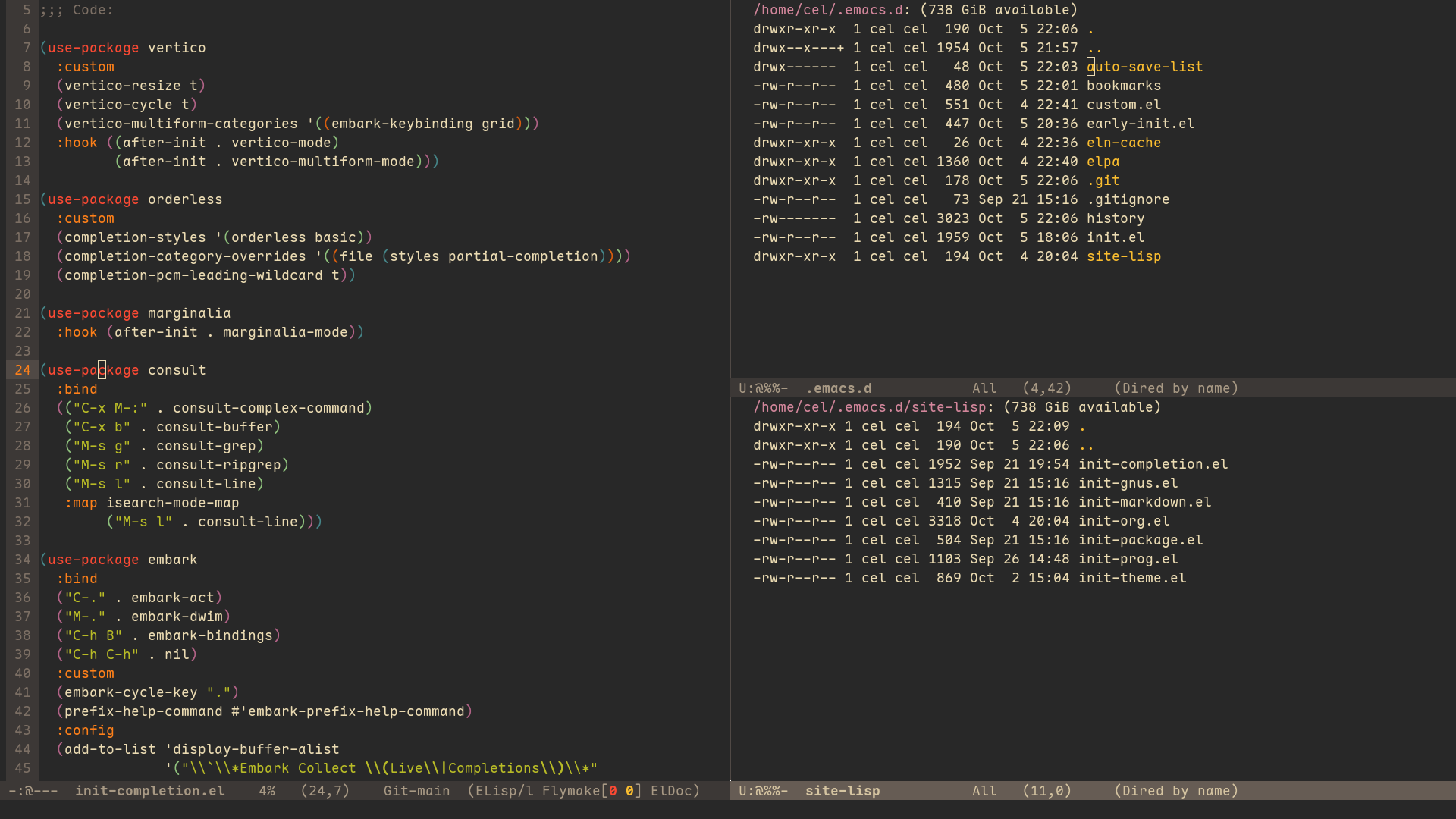
Emacs is considered one of the two most powerful text editors along with Vim. And due to the nature of a Lisp and Scheme interpreter, its capabilities extend far beyond text editing—it is more like an operating system. However, precisely because of its power and its long history spanning several generations of computers, using and configuring it is often considered complex and difficult. I share this view, but I believe that using Emacs’s basic features is entirely accessible. Furthermore, I believe Lisp and Scheme to be the most expressive programming languages, which makes configuring and using Emacs an interesting and rewarding activity.
Emacs supports a wide range of operating systems, and its basic usage can be found in its official documentation. It’s safe to say that users who have mastered most of the commands listed there are already quite proficient with this text editor.
And customizing Emacs with Elisp can make it more user-friendly. This article introduces some of my Elisp configurations, which I hope will be helpful to readers.
~/.emacs.d/
This is the directory Emacs reads when it starts up; the vast majority of configuration files should be placed here. I’m currently using the latest version of Emacs(31.1).
early-init.el
This is the first file Emacs reads in the directory. Any changes Emacs needs to make right from the start—such as UI modifications—should be placed here. Below are my main settings:
(setq gc-cons-threshold (* 128 1024 1024))  ; Improve performance

;; Remove unnecessary UI elements
;; Users who are not yet familiar with Emacs may want to keep these
(menu-bar-mode 0)
(tool-bar-mode 0)
(scroll-bar-mode 0)

(setq inhibit-startup-message t)  ; Hide the startup screen

;; As Emacs continues to evolve, it now provides excellent support for GUI operations.
;; When customizing Emacs via the GUI, code is automatically added to the configuration file
;; For easier management, you can have Emacs place this code in a separate file, such as custom.el
(setq custom-file (expand-file-name "custom.el" user-emacs-directory))
(load custom-file :no-error-if-file-is-missing)
init.el
After Emacs finishes reading early-init.el, it will read the init.el file. Because Emacs configurations vary widely, I manage my settings using a modular approach. I add the following at the beginning of the file:
;; Load configuration files from the site-lisp directory
(add-to-list 'load-path
             (expand-file-name "site-lisp" user-emacs-directory))
This way, you can add various module configurations to the site-lisp directory for easier management.
In fact, many packages have already been released in the community. To use these packages, the first step is to configure the repositories. I’ve placed the relevant configuration in site-lisp/init-package.el:
(require 'package)

;; Two official Emacs repositories: [[https://elpa.gnu.org/][GNU ELPA]] and [[https://elpa.nongnu.org/][NonGNU ELPA]] are already built into the current version of Emacs, so you only need to add MELPA.
;; According to [[https://melpa.org/#/getting-started/][MELPA]], the following configuration is recommended:
(add-to-list 'package-archives
             '("melpa" . "https://snapshots.melpa.org/packages/"))

;; Priority order for installing archives when downloading packages
;; Here, the priority is melpa > nongnu > gnu
(setq package-archive-priorities
      '(("gnu"    . 1)
        ("nongnu" . 2)
        ("melpa"  . 3)))

(package-initialize)
(unless package-archive-contents
  (package-refresh-contents))

;; In newer versions of Emacs, use-package is built-in
(require 'use-package)
(setq use-package-always-ensure t)

(provide 'init-package)
Then add (require 'init-package) to init.el. The init-package module is now successfully loaded.
Proxy
When using Emacs, you may occasionally need to connect to the Internet—for example, to install packages from the package archives configured above, or to use services like eww and gnus. In such cases, some users may want to set up a proxy. Services that use HTTP, such as eww, can automatically read the proxy environment variables in the GNU/Linux system, so no additional configuration is required. However, other services, such as nntp, do not read these variables and require you to configure a SOCKS proxy within Emacs. Unfortunately, this feature has not been well implemented so far. For simplicity, you can use proxychains to route all Emacs traffic through a proxy:
$ proxychains emacs
init.el again
Now it’s time to really start customizing. I manage all of Emacs’s built-in configuration options using the “emacs” pseudo-package provided by use-package:
(use-package emacs
  :custom
  (ring-bell-function 'ignore)  ; Disable the bell
  (require-final-newline t)  ; Add a newline at the end of each file if one's missing
  (mouse-yank-at-point t)  ; Paste clipboard contents at the cursor position
  (global-auto-revert-non-file-buffers t)  ; Auto revert non-file buffers such as Dired
  (load-prefer-newer t)  ; Load the latest version of the el or elc file
  (uniquify-buffer-name-style 'forward)  ; Display the path before the buffer name for files with the same name
  (ediff-window-setup-function 'ediff-setup-windows-plain)  ; Do not open a new frame for ediff
  (enable-recursive-minibuffers t)  ; Allow nested minibuffers
  ;; Hide commands in M-x which do not work in the current mode
  (read-extended-command-predicate #'command-completion-default-include-p)
  ;; Do not allow the cursor in the minibuffer prompt
  (minibuffer-prompt-properties
   '(read-only t cursor-intangible t face minibuffer-prompt))
  ;; Disable the ispell word completion
  ;; The function can be replaced with cape
  (text-mode-ispell-word-completion nil)
  (tab-always-indent 'complete)  ; TAB key is used for completion and indentation
  (indent-tabs-mode nil)  ; Indent using spaces instead of tabs

  ;; Gnus elisp startup file location
  (gnus-init-file
   (expand-file-name "site-lisp/init-gnus.el" user-emacs-directory))

  :custom-face
  ;; Font and size settings
  (default        ((t (:family "JetBrains Mono" :height 110))))
  (fixed-pitch    ((t (:family "JetBrains Mono" :height 1.0))))
  (variable-pitch ((t (:family "Inter" :height 1.05))))

  :config
  (context-menu-mode)  ; Enable right-click context menu
  (delete-selection-mode)  ; Typing overwrites selected text
  (winner-mode)  ; Remember window layout
  (savehist-mode)  ; Persist mini-buffer history
  (global-auto-revert-mode)  ; Automatically refresh buffer after external file changes
  (line-number-mode)  ; Display line numbers in the mode line
  (column-number-mode)  ; Display column numbers in the mode line

  ;; Use [[https://www.passwordstore.org/][pass]] to manage passwords
  ;; This will be used in the init-gnus.el file discussed below
  (auth-source-pass-enable)

  :hook
  ((prog-mode conf-mode)  . display-line-numbers-mode)  ; Display code line numbers in the left sidebar in these modes
  )
Some of the configurations above work in conjunction with the configuration files discussed below to achieve better results.
init-theme.el
Emacs offers a wide variety of themes to choose from. I wrote the code below to help me apply and manage themes more conveniently.
;; Download themes if the ones you like aren’t included by default in Emacs
(use-package gruvbox-theme)

;; List of alternative themes to apply
(defvar all-themes '(gruvbox-light-medium
                     gruvbox-dark-medium))

(defun set-default-theme ()
  "Load the first theme from `all-themes'."
  (interactive)
  (load-theme (car all-themes) t))

(defun cycle-themes ()
  "Cycle through themes in `all-themes'."
  (interactive)
  ;; Find the next theme in the list after the current one
  (let ((next (or (cadr (memq (car custom-enabled-themes) all-themes))
                  (car all-themes))))
    ;; Disable the current theme—this step is required
    ;; Otherwise, the next theme will overlap the previous one
    (mapc #'disable-theme custom-enabled-themes)
    (load-theme next t)
    (message "Current theme: %s" next)))

(set-default-theme)
(global-set-key [f5] #'cycle-themes)  ; Bind the F5 key to cycle through themes

;; This package is especially essential when writing Lisp code
(use-package rainbow-delimiters
  :hook (prog-mode . rainbow-delimiters-mode))

(provide 'init-theme)
The code allows you to switch themes using the F5 key. You can add or remove alternative themes from the all-themes list.
init-completion.el
This section is the core of the entire configuration. Its purpose is to enhance Emacs’s mini-buffer and autocompletion features, which will significantly improve Emacs’s usability. There are already many mature solutions available in the community. I chose the Vertico series, which uses Emacs’s official completing-read API and aligns with my goal of keeping the configuration as close to vanilla Emacs as possible.
Here is the specific configuration, which basically follows the official guidelines:
(use-package vertico
  :custom
  (vertico-resize t)
  (vertico-cycle t)
  ;; Makes the styling similar to which-key
  (vertico-multiform-categories '((embark-keybinding grid)))
  :hook ((after-init . vertico-mode)
         (after-init . vertico-multiform-mode)))

(use-package orderless
  :custom
  (completion-styles '(orderless basic))
  (completion-category-overrides '((file (styles partial-completion))))
  (completion-pcm-leading-wildcard t))

(use-package marginalia
  :hook (after-init . marginalia-mode))

(use-package consult
  :bind
  (("C-x M-:" . consult-complex-command)
   ("C-x b" . consult-buffer)
   ("M-s g" . consult-grep)
   ("M-s r" . consult-ripgrep)
   ("M-s l" . consult-line)
   :map isearch-mode-map
        ("M-s l" . consult-line)))

(use-package embark
  :bind
  ("C-." . embark-act)
  ("M-." . embark-dwim)
  ("C-h B" . embark-bindings)
  ("C-h C-h" . nil)  ; https://github.com/justbur/emacs-which-key/issues/175
  :custom
  (embark-cycle-key ".")  ; https://github.com/oantolin/embark/issues/786
  (prefix-help-command #'embark-prefix-help-command)  ; Can replace which-key
  :config
  (add-to-list 'display-buffer-alist
               '("\\`\\*Embark Collect \\(Live\\|Completions\\)\\*"
                 nil
                 (window-parameters (mode-line-format . none)))))

(use-package embark-consult)

(use-package helpful
  :bind
  ("C-h M-f" . helpful-callable)
  ("C-h M-k" . helpful-key)
  ("C-h M-v" . helpful-variable)
  ("C-h M-x" . helpful-command)
  ("C-h M-o" . helpful-at-point))

(use-package corfu
  :custom
  (corfu-cycle t)
  (corfu-quit-at-boundary nil)
  (corfu-quit-no-match nil)
  (corfu-preview-current nil)
  (corfu-preselect 'prompt)
  (corfu-on-exact-match 'insert)
  :hook (after-init . global-corfu-mode))

(use-package cape
  :hook
  (completion-at-point-functions . cape-dabbrev)
  (completion-at-point-functions . cape-file)
  (completion-at-point-functions . cape-elisp-block)
  :bind ("C-c p" . cape-prefix-map))

(provide 'init-completion)
init-org.el
Org mode is a note-taking application for Emacs. It is very powerful and is undoubtedly a killer app. A detailed explanation of it would require a separate article. Here, I’ll briefly cover some configuration options to help readers get started.
(use-package org
  :init
  (setq org-directory "~/org/")  ; root directory
  :custom
  (org-startup-folded t)  ; open org files fully folded
  (org-startup-truncated nil)  ; wrap long lines
  (org-ellipsis "…")  ; folding ellipsis character
  ;; editing invisible text: reveal first, error on danger
  (org-fold-catch-invisible-edits 'show-and-error)
  (org-auto-align-tags nil)  ; don't auto-realign tags
  (org-tags-column 0)  ; tags sit right after the headline
  (org-log-into-drawer t)  ; state notes and timestamps all go into the :LOGBOOK: drawer
  (org-log-repeat 'note)  ; prompt for a note each time a repeating task is done
  ;; Use fixed-width fonts for code blocks, tables, labels, dates, etc., to ensure proper alignment
  ;; This prevents the Org content from appearing disorganized when displayed with variable-width fonts
  :config
  (dolist (face '(org-block org-block-begin-line org-block-end-line
                            org-table org-formula org-checkbox org-list-dt
                            org-document-info-keyword org-drawer
                            org-property-value org-tag org-tag-group
                            org-date org-column org-column-title
                            org-hide))
    (set-face-attribute face nil :inherit 'fixed-pitch))
  (dolist (face '(org-code org-verbatim))
    (set-face-attribute face nil :inherit '(fixed-pitch shadow)))
  (set-face-attribute 'org-special-keyword nil :inherit '(fixed-pitch font-lock-keyword-face))
  (set-face-attribute 'org-meta-line nil :inherit '(fixed-pitch font-lock-comment-face))
  ;; global keybindings
  :bind
  ("C-c a" . org-agenda)
  ("C-c l" . org-store-link)
  ("C-c c" . org-capture))

(use-package calendar
  :custom
  (calendar-mark-diary-entries-flag t)  ; mark diary entries inside calendar buffers
  (diary-file (expand-file-name "diary" org-directory))  ; diary file location
  )

(use-package org-agenda
  :ensure org
  :custom
  (org-agenda-files ("~/org/task.org"))  ; agenda sources
  (org-agenda-include-diary t)  ; diary file entry merged into agenda
  (org-agenda-start-on-weekday 0)  ; week view starts on Sunday
  (org-agenda-tags-column 0)  ; no right-aligned tag column in agenda
  (org-agenda-skip-scheduled-if-done t)  ; DONE entries drop their SCHEDULED from the agenda
  (org-agenda-skip-deadline-if-done t)  ; DONE entries drop their DEADLINE from the agenda
  )

(use-package org-capture
  :ensure org
  :custom
  (org-default-notes-file (expand-file-name "note.org" org-directory))  ; default capture target

  (org-capture-templates  ; C-c c template menu
   '(("f" "Fast" entry  ; quickly capture notes
      (file org-default-notes-file)
      "* %?\n%U%i\n%a\n")  ; blank entry + timestamp + clipboard + link
     ("t" "Todo" entry  ; Todo file
      (file "~/org/task.org" "Tasks")
      "* TODO %?\nSCHEDULED: %T\n")
     ("j" "Journal" entry  ; Journal file
      (file+olp+datetree "~/org/journal.org")
      "* %?\n%U\n")))
  ;; refile targets: headings at level 3 or higher in agenda files
  (org-refile-targets '((org-agenda-files :maxlevel . 3)))
  (org-refile-use-outline-path 'file)  ; completion shows full "file/heading/subheading" paths
  (org-refile-allow-creating-parent-nodes 'confirm)  ; refile to a non-existing path: ask, then create it
  (org-outline-path-complete-in-steps nil)  ; single-pass completion, not step-by-step (vertico/orderless friendly)
  )

;; prettier headline bullets
(use-package org-superstar
  :after org
  :custom
  (org-superstar-headline-bullets-list '(?◉ ?○ ?◎ ?●))  ; level 1-4 headline markers
  (org-superstar-cycle-headline-bullets nil)  ; never rotate bullets across levels
  (org-superstar-leading-bullet ?\s)  ; leading stars render as spaces
  (org-superstar-prettify-item-bullets t)  ; nicer list bullets
  :config
  ;; These three faces also use a fixed-width font, aligned with other monospaced elements in the header row
  (dolist (face '(org-superstar-header-bullet
                  org-superstar-item
                  org-superstar-ordered-item))
    (set-face-attribute face nil :inherit 'fixed-pitch))
  :hook (org-mode . org-superstar-mode))

(use-package ox-hugo :after ox)  ; Hugo export backend

(provide 'init-org)
init-markdown.el
Since Org mode works perfectly well as a basic markup language, I don’t often use Markdown in Emacs. However, there is still a dedicated mode available for handling Markdown files.
(use-package markdown-mode
  :mode
  (("\\.md\\'"       . markdown-mode)
   ("README\\.md\\'" . gfm-mode)  ; GitHub format
   )
  :custom
  (markdown-command  ; need pandoc
   '("pandoc" "--from=markdown" "--to=html5" "--standalone"))
  (markdown-enable-wiki-links t)  ; Enable wiki link syntax support
  )

(provide 'init-markdown)
init-gnus.el
Gnus is another powerful tool for Emacs. It was originally a newsgroup reader, but because email and newsgroups share certain similarities, it has been extended to support email as well. I currently use Thunderbird to send and receive email, and I’m very satisfied with it, so I have no plans to switch to Emacs for now. My Gnus is still used exclusively for newsgroups.
(use-package gnus
  :custom
  (user-full-name "Planet I Kiru")
  (user-mail-address "[email protected]")
  (gnus-select-method '(nnnil ""))
  (gnus-secondary-select-methods
   '((nntp "eternal-september"
           (nntp-address "news.eternal-september.org")
           (nntp-port-number 563)
           (nntp-open-connection-function nntp-open-tls-stream)
           (nntp-authinfo-force t))
     (nntp "gmane"
           (nntp-address "news.gmane.io"))
     (nntp "blueworldhosting"
           (nntp-address "archive.usenet.blueworldhosting.com")
           (nntp-port-number 563)
           (nntp-open-connection-function nntp-open-tls-stream)))))
Conclusion
These are some of the configurations I use when working with Emacs. Features like Org mode offer many more options to explore. Additionally, Emacs, of course, has extremely powerful code editing and development capabilities. Due to space limitations, I won’t go into detail here. I may cover these topics in future articles. Thank you for reading.